
This website is and has been hosted on Codeberg, but the domain notejo.com has originally been provided by Cloudflare. However, I decided to switch domain providers, because Cloudflare is a big tech company, so I decided to switch to a local provider. Felixilef recommended Netcup to me, which is based in Germany and very cheap. I decided to give it a shot and migrated this website to notejo.de.
How to setup your Codeberg page with Netcup#
To setup your Codeberg website you might want to check out my original guide, but then come back after reaching the Cloudflare part.
Setting up your custom domain with Netcup is luckily easier than with Cloudflare. First purchase your domain and put it into your hugo config file and into the .domain file.
Go to Netcup’s customer control panel and click on the domains tab. After paying your invoice the domain should appear in the Result box. Click on the magnifying glass 🔎 and then on the DNStab in the box. You can delete any entries and replace them with the following three:
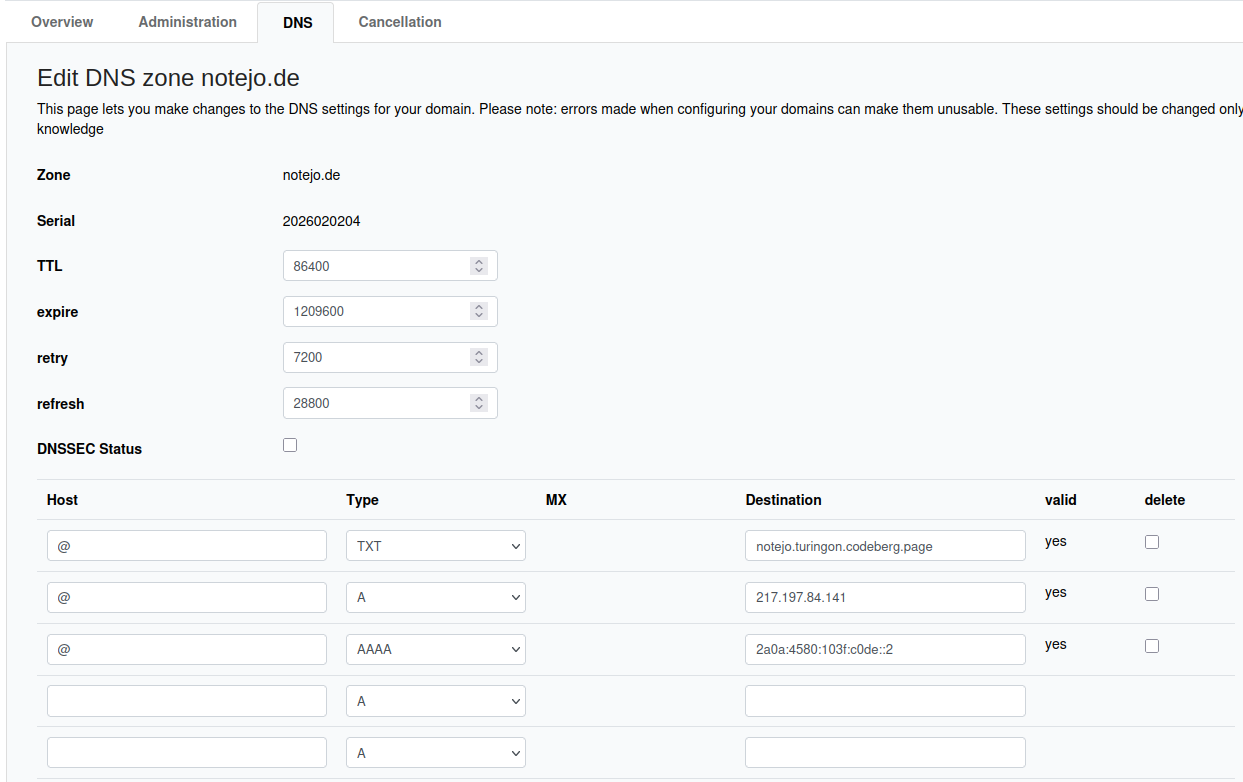
The record will look like this (name) : A : (IPv4 Address)
@:A:217.197.91.145
The second one is (name) : AAAA : (IPv6 Address)
@:AAAA:2001:67c:1401:20f0::1
And the final one (name) : TXT : (content)
@:CNAME:"<your repository name>.<your username>.codeberg.page"
You’ll have to wait for about 30 minutes before you can then finally access your website and that should do it!
Reply by Email